MarketCheck's assistant and shared memory

Meet Marque(say "mark")

Marque has read our contracts, CRM, support tickets, billing, wiki, product docs, shared mailboxes and BigQuery schemas. It answers with citations, runs multi-step work with tools, writes branded documents, and acts on Jira, Copper and email with your approval. Everything it shows you respects your own access: what your department, seat and grants allow, nothing more.

Sign in with Google

marketcheck.com and zerebral.co.in accounts that an admin has approved.

What it draws from

Connected right now

Read live from the sources table: every enabled connector, what it feeds, who can see it, and when it last synced. Counts are documents indexed; sources marked live query are consulted at ask time instead of being copied in.

Documents & contracts

Drive folders and drop zones, parsed page by page: PDF, Word, Excel, PowerPoint.

  • Contracts

  • Drive: QuickBooks exports (CFO)

  • Drive: UK Active Contracts (My Drive)

  • Drive: UK Contracts In Progress (My Drive)

  • Drive: UK Contracts LOST (My Drive)

CRM

Copper companies, people, leads, opportunities and notes.

  • Copper CRM

Support

Zendesk tickets with their full comment history.

  • Zendesk Support

Engineering

Jira issues and epics, Confluence pages and release notes.

  • Confluence (MarketCheck)

  • Jira (MarketCheck)

Billing

Stripe customers, subscriptions and invoices, read only.

  • Stripe (US Live)

Data

BigQuery datasets and table schemas, so a question can become a query.

  • BigQuery (MarketCheck)

Mailboxes

Shared inboxes read as knowledge; api@ and info@ are also watched for replies.

  • Group: info@marketcheck.com

  • Mailbox: api@marketcheck.com

  • Mailbox: marque@marketcheck.com

  • Mailbox: sales@marketcheck.com

Docs & web

Developer docs, portal pages, the marketing site and uploads.

  • API docs (apidocs.marketcheck.com)

  • Web crawl: auto.dev

  • Web Crawl: BlackBook.com

  • Web Crawl: vinaudit.com

Live agents

Other assistants Marque consults at ask time, like the Dev Portal Ask AI.

  • Ask AI (Dev Portal Agent)

Connected tools (MCP)

External MCP servers queried live under their own credentials.

  • Atlassian (Jira + Confluence)

  • ExportDeck (data feed deliveries)

  • MarketCheck AI Reports

  • Ortto

  • Stripe

Everything else

Captures and records that fit no other group.

  • Calendar: sales meeting history

  • Google Meet: sales call transcripts

  • Meeting insights (mined themes)

  • QuickBooks: Marketcheck (USD home file)

What it can do

Eight things, all working today

Every example below is a real prompt that ran this week. Screenshots are from the current build.

Ask

Cited answers over everything you are allowed to see. Ask in plain English and get an answer with numbered sources, a table when the data is tabular, and contact details masked unless your role may see them.

Try asking

  • Which enterprise contracts renew in the next 90 days, and what do they commit us to?
  • What are the top support ticket drivers this month?
  • Give me a 360 on Cox Automotive: contracts, open pipeline, support history, billing.
Agent mode

Switch the composer to Agent and Marque plans its own steps: search, the change log, live consults (BigQuery, Jira, Zendesk, Stripe, Drive), document generation, up to 50 tool calls per run. Anything that writes outside Marque (Jira, Copper, email) pauses for your approval unless the thread is set to auto-approve.

Try asking

  • Query BigQuery for auction listing counts by state, top 5.

    writes and runs the SQL, returns a table

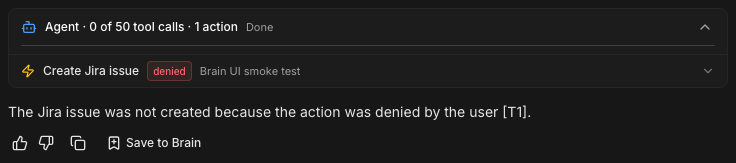
  • Create a Jira issue in project MIT titled "Brain UI smoke test", due 2026-09-30.

    shows the approval card; deny it and the run records the denial

  • Make me a branded PDF summarizing the Cox NeoVIN evaluation agreement.

    two tool calls: search, then generate

An agent run where the Jira create action was denied
An action the user declined. The run ends honestly: the issue was not created, and the answer never claims otherwise.

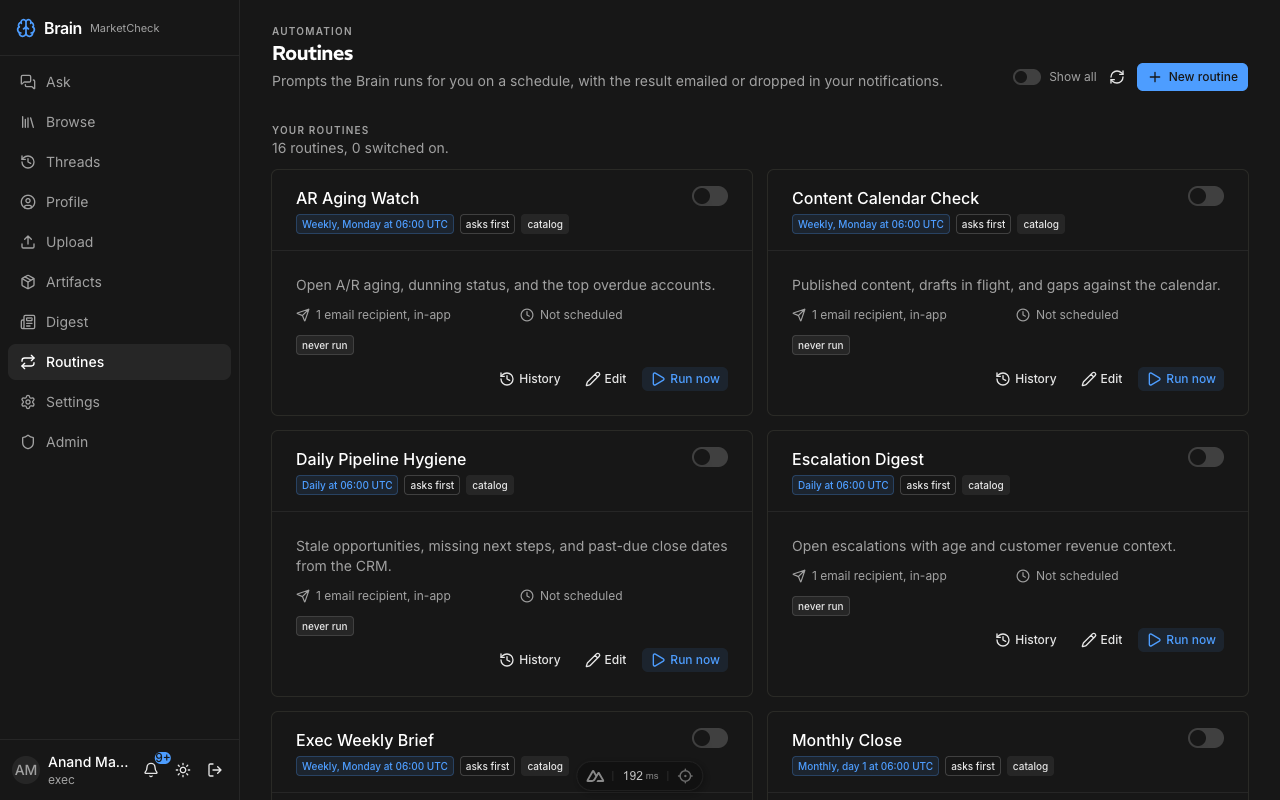
Routines

Scheduled briefs Marque runs for you: daily, weekly or monthly at a time you pick, delivered by email and as an in-app notification, with an optional Word, Excel or PDF attachment. Enable one from the catalog, adjust the cadence, and choose whether actions ask first or run automatically.

From the catalog

  1. Weekly Pipeline Review

    Pipeline movement, commit vs forecast, and at-risk deals with citations. Weekly, for sales.

  2. AR Aging Watch

    Open A/R aging, dunning status, and the top overdue accounts. Weekly, for the CFO seat.

  3. Exec Weekly Brief

    Releases, pipeline, quality deltas and the action-item scorecard, under 400 words. Weekly, for the CEO seat.

The Routines page listing catalog routines with cadence, approval mode and recipients
The Routines page: sixteen catalog routines, each with its cadence, approval mode, recipients and run history. Flip the switch to enable one; Run now tests it immediately.

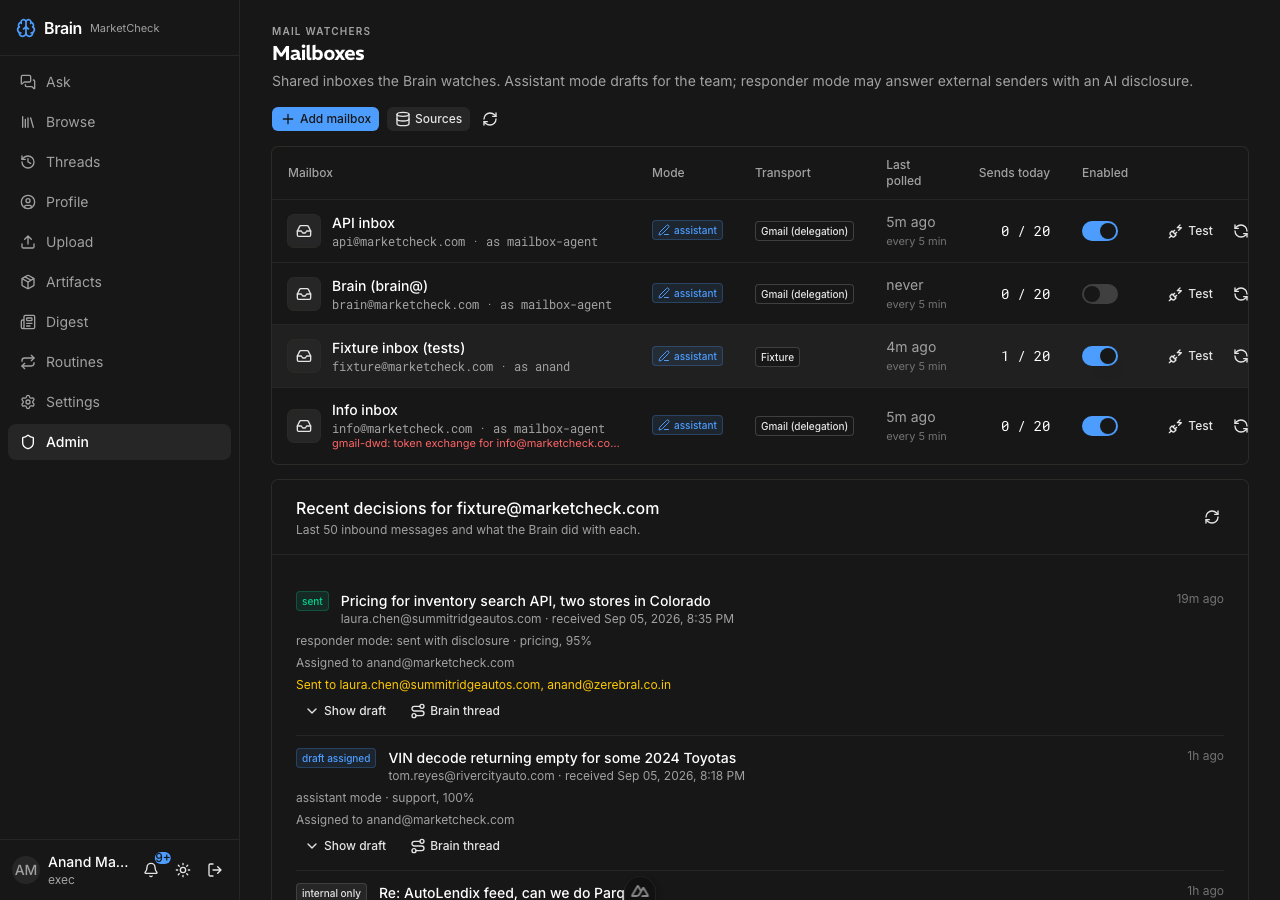
Mailboxes

Marque watches shared inboxes. In assistant mode it drafts the reply inside the mailbox and notifies the reps in the thread; in responder mode it may answer external senders itself, with an AI disclosure and the reps copied. Reply to the notice to change the draft; start with "always" and it becomes a standing instruction for every future draft.

What happens on api@, end to end

  1. A prospect writes to api@

    Every 5 minutes Marque reads new mail, skips automation and internal threads, and classifies the rest: intent, needs a reply, sensitive.

  2. It drafts and assigns

    It gathers facts from the knowledge base and live sources, drafts six sentences at most with prices only as retrieved, saves the draft in the mailbox and notifies the reps in the thread.

  3. Follow-up steps run

    For external, non-sensitive senders it finds or creates the Copper lead, attaches the draft as a note, opens a two-day follow-up task, opens a Qualified opportunity for sales intents, and labels the thread Marque/Drafted.

The Mailboxes admin page with watched inboxes and recent decisions
Watched inboxes with mode, transport, last poll and the daily send cap, plus every decision Marque took: sent, draft assigned, internal only.

Contribute by email

Teach Marque without leaving your inbox. Send, forward or CC marque@marketcheck.com and the thread joins the knowledge base, attachments included (PDF, Word, Excel, PowerPoint, text). A short directive in the subject decides where it lands.

Subject lines that route

  • [sales] Cox renewal call notes

    lands in the sales brain, tagged dept:sales

  • [org] [tag: pricing, neovin] Updated rate card for 2027

    org brain, tagged pricing and neovin

  • Fwd: Feed spec for Ethos #feeds

    no bracket directive: an org-domain sender to marque@ shares with everyone; the hashtag becomes a topic tag

[sales] [eng] [product] [data] [finance] [marketing] [support] [ops] [legal] [people] [exec]
Route to that department brain. A department directive always wins.
[org]
Share with everyone.
[tag: a, b] or #tag
Add topic tags. Ticket numbers like #4821 stay in the title.
[EXTERNAL], [Ticket 12]
Unknown brackets are not directives and stay in the title.
Attribution
The thread is attributed to the sender when the address maps to a Marque principal.

Artifacts

Ask for a document and get a file: Word, Excel, PowerPoint or PDF, MarketCheck-branded by default (logo, blue rule, Inter body, page numbers and a Prepared by Marque footer), stored under Artifacts and linked from the answer. Private to you unless you publish it.

Try asking

  • Make me a branded PDF summarizing the Cox NeoVIN evaluation agreement term and renewal.
  • Put our API pricing tiers and per-call rates in a one-page Word summary for a dealer-group prospect.
  • Build an Excel register of our data license agreements with renewal term and notice period per client.

Polling sync and nightly re-sync

Marque is private: nothing outside Google can reach it, so it pulls changes instead of receiving webhooks. Copper, Jira and Stripe changes are polled every 5 to 15 minutes, and every source also re-syncs on its schedule: a nightly pass at 00:00 UTC for daily sources and a 30-minute tick for hourly ones.

In practice

  1. Copper within minutes

    New leads, people and companies are picked up every 5 minutes and enriched; the full Copper source re-syncs hourly.

  2. Freshness you can check

    Every source row shows its last sync; the admin sources page adds a fresh or stale verdict against each source's SLO.

Copper
New records every 5 minutes, full re-sync hourly.
Jira, Zendesk, Stripe
Jira events every 15 minutes, Stripe events every 10, Zendesk hourly.
Google Drive
Nightly re-sync; push channels wait for a verified domain.
Nightly anchor
00:00 UTC for daily-and-slower sources; a 30-minute tick carries hourly ones.
Reachability
Behind Google Identity-Aware Proxy: only approved colleagues get through, and no webhook or MCP endpoint is open.

Who sees what

Marque is one system with many brains. Everyone gets the org brain; your department brain comes with your department; CXO seats read across departments; anything beyond that is an explicit, admin-controlled, version-controlled grant. Sources are filtered before the model sees them, contact details are masked for most roles, and every ask, tool call and denial is audited.

In plain words

  1. Department brains

    Sales sees sales, engineering sees engineering. Finance and legal documents carry tier T3 and stay with those teams.

  2. CXO seats

    A seat (CEO, CFO, CRO, CTO and the rest) reads every department at tiers T0 to T3, with a lens that frames the answer for that job. A lens never grants access.

  3. Masking and audit

    Emails and phone numbers are masked unless you are finance, people, a CXO seat or an admin. Denials are logged with the reason; asks are logged with every source and tool used.

What you will not see: documents outside your brains, tier T4 files unless you are named on them, other people's personal brains, and contact details your role is not entitled to. If an answer seems thin, that is usually why. Ask an admin for a grant rather than a workaround.

Org brain
Every active principal.
Department brain
Comes with your department; department heads get the group token.
CXO seat
All twelve brains, tiers T0 to T3, unmasked contact details, seat lens.
Tier T4
Executive-explicit: superadmin or a named per-principal grant only.
Personal brain
Your uploads and captures. Private to you.

How to start

Three steps

  1. 01

    Sign in with Google

    Use your marketcheck.com or zerebral.co.in account. If you are not on the access list yet, the sign-in page says so and an admin can add you in a minute.

  2. 02

    Pick a starter question

    The Ask screen opens with starters for everyone, your department and any seat you hold. Try one, then follow the citations.

  3. 03

    Save what you learn

    Use Save to Marque on a good answer, upload a file, or CC marque@marketcheck.com on the next useful thread. Tomorrow's answers get better.

The Ask screen header with starter questions
Starter questions on the Ask screen, filtered to your department and seats.

Internal preview for MarketCheck staff. Not for customers.

Prepared by Marque at MarketCheckversion f422dbb